
Agent integration overview
GoodVision offers three composable capabilities for Agent developers: choose an identity, receive business changes, and execute business actions.
Applications and credentials establish the application, user or service identity, and environment.
Event SDK receives subscribed events over a long connection or Webhook and acknowledges them after durable processing.
GoodVision CLI lets Codex discover APIs, inspect parameters, preview requests, and call public model, customer, subscription and order operations. Use the same TypeScript SDK in application code.
Capabilities at a glance
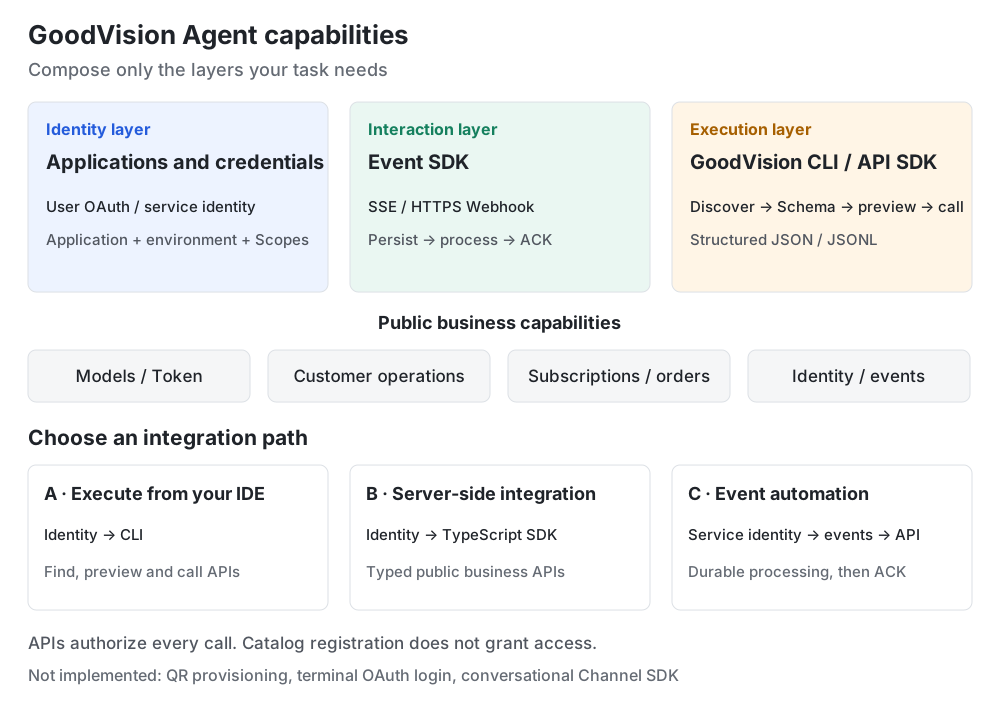
Combine layers as needed. Calling an API requires its identity but does not require an event connection. The interaction layer here receives business events; a conversational Channel SDK with streaming messages or cards is unavailable.
| Capability | When to use it | Form | Integration guide |
|---|---|---|---|
| Applications and credentials · Identity layer | Establish identity, consent, Scopes and sandbox or production context. Goal: obtain the identity required for this task. | Developer console, web OAuth/PKCE, application service credentials; CLI private-file references | Create and test an application, user authorization, authentication |
| Event SDK · Interaction layer | Receive subscribed events, process idempotently by event ID and acknowledge after durable completion. Goal: respond to business changes. | TypeScript/Node.js SDK, SSE, HTTPS Webhook and receiver templates | Long connections, Webhooks, application users and events |
| GoodVision CLI · Execution layer | Discover public capabilities, inspect Schema, call APIs and compose scripts. Goal: execute authorized business actions. | goodvision/gv CLI, @goodvision/sdk, JSON/JSONL; npm packages and source | GoodVision CLI, API products, templates |
Choose your integration path
| Path | Suitable scenarios | Combination | First task |
|---|---|---|---|
| A · Execute from your IDE | Discover capabilities, debug APIs and generate integration code in Codex | Identity → CLI | Find the user-context API, inspect parameters and preview a sandbox request |
| B · Server-side integration | Call public business APIs from your application or scripts | Identity → TypeScript SDK | Query eligible models, customer records or orders with the current identity; handle responses using Schema |
| C · Event-driven automation | Continuously process subscribed business changes | Service identity → Event SDK/Webhook → business API | Persist an event, read its current state, process idempotently, then ACK |
Service identity applies only to operations that explicitly support it. Current-user, customer-consent and product-policy operations still require their own authorization. An event connection does not grant business access.
Business capability map
Explore models and Token, customer operations, subscriptions, orders and payments, user context, application releases, events and diagnostics in the GoodVision CLI capability map.
Shortest path to a first call
- Install the CLI and SDK from npm using the GoodVision CLI guide.
- Configure your application and
sandboxcontext. Inspect configuration withauth statusand credential acquisition withauth check. - Explore
api products, find an operation withapi search, inspect itsschema, preview with--dry-run, then execute explicitly. Scripts should pin the application and environment with--profile.
For example, ask Codex:
Use GoodVision CLI api products to explore global capabilities, then find the user-context API and inspect its parameters and Scopes.
Preview the request with my sandbox profile and show it for confirmation before calling it.
The catalog establishes contract registration. Credential checks establish that a file can be read or a Token obtained. Each API request checks actual business authorization and resource availability. Application service identity never substitutes for user consent.
SDK and events
TypeScript/Node.js projects use @goodvision/sdk with the same operation IDs and generated public types. Process events durably and idempotently by event ID before ACK. events watch is a debugging command and never automatically acknowledges business completion. Choose the api, pkce-web, event-receiver or webhook template as needed.
The current event SDK consumes platform events. A conversational Channel SDK with chat sessions, message rendering or streaming cards is unavailable. QR application creation and terminal OAuth login are also unavailable; use the existing developer console and web authorization flow. Customer delegation of third-party application business operations is outside the current offering.
Availability and next steps
| Status | Capability | Current path |
|---|---|---|
| npm packages and source available | CLI, TypeScript SDK, discovery, Schema, request preview, multiple Profiles, four templates, SSE and Webhook receivers | Install from npm using the CLI guide; APIs authorize each business call |
| Not implemented | QR application provisioning, terminal OAuth login/logout, conversational Channel SDK, delegated third-party application business actions | Use console creation, web consent and business events until the relevant public contracts and acceptance are delivered |