
Applications, users and event correlation
This guide covers login, customer relationships and events when one developer business owns multiple Applications. Application A and Application B are fictional examples.
1. How many Applications do you need?
| Product setup | Configuration |
|---|---|
| Two independent products | Two Applications with separate login, API grants, webhooks and subscription plans |
| One product needs login and background calls | Enable user and service identities in one Application; these identities do not require two Applications |
| Sandbox and Production for one product | Independent Applications; Production references an accepted Sandbox |
The business at the top of Developer Console manages your Applications. Common ownership does not share Clients, Secrets, API grants, user consent or paid access.
Two Applications may use the same server code, but requests and events must use their own Application, environment and credentials. Do not use Application A's Client for Application B or combine their subscription records.

View the full relationship diagram
2. Configure only what you use
User login alone does not require a service Secret. A product that does not sell through the platform need not prepare subscription plans first.
| Purpose | What you provide | Console location | Check before integration |
|---|---|---|---|
| User login | Implemented callback; review automatically completed logout URL and web origin if needed | Developer integration → OAuth/OIDC configuration → User identity | Identity is active; Client ID and exact callback match; no Client Secret |
| Background APIs | Required APIs and permissions | Credentials and basics; Developer integration → APIs and permissions → Application identity | Identity is active, grants are enabled and bound, Secret is stored on your server |
| Subscriptions and payments | Plans, platform-managed purchase entry and required capabilities | Commerce → Subscription plans / Billing and fulfillment | Plans are available, capabilities are active, customer purchase page reads this Application's catalog and environment |
| Business events | Event types; application identity for long connection, public URL only for HTTPS | Developer integration → Events and webhooks | Active subscription; ACK after processing or return 2xx after safe HTTPS receipt |
| Application directory entry | Public HTTPS home or login page | Application → Application publication | Publication is active; it does not grant customer product access |
The login callback receives an authorization code. The customer entry URL opens the product. A web origin contains only scheme, host and port, without a callback path.
For https://app.example.test/auth/callback, the origin is https://app.example.test; a post-logout URL can be https://app.example.test/. Your application must implement the callback; the platform does not create third-party routes.
Read the Issuer, Client ID and bound permissions from the current Application, not another Application or environment. See Authentication and Receive webhooks.
3. Resolve the user and customer space after login
After OIDC login, your server calls Users and customer spaces. Send {} at first entry. The platform prepares or reuses a personal space and returns the current user, space and membership; you do not create these mappings manually.
| Identifier | How to use it |
|---|---|
user.open_id | Correlate a user within the current Application |
user.union_id | Correlate one person across two Applications under the same developer and environment |
space.organization_id | Current customer space for business requests and subscriptions |
space.membership_id | Correlate the current person's membership events in this space |
application_id, environment | Identify the Application and Sandbox or Production |
Subscription id | Correlate one subscription; matches event resource_id according to its Schema |
Cross-Application identity rules are described in open_id and union_id. Clients, grants and paid access remain independent.
Treat organization_id as an opaque reference that users do not enter. Your developer business manages Applications; customer spaces purchase and use products. Never hardcode your developer business as every customer's space. OIDC iss + sub, private identities, memberships and public aliases are not interchangeable; do not merge people by email.
If space resolution is temporarily unavailable, preserve verified login and offer retry. If an Application or membership becomes invalid, stop operations in that scope and confirm selection. Do not silently move the original purchase to another space. Identity correlation grants no product, paid, credit or platform privileges.
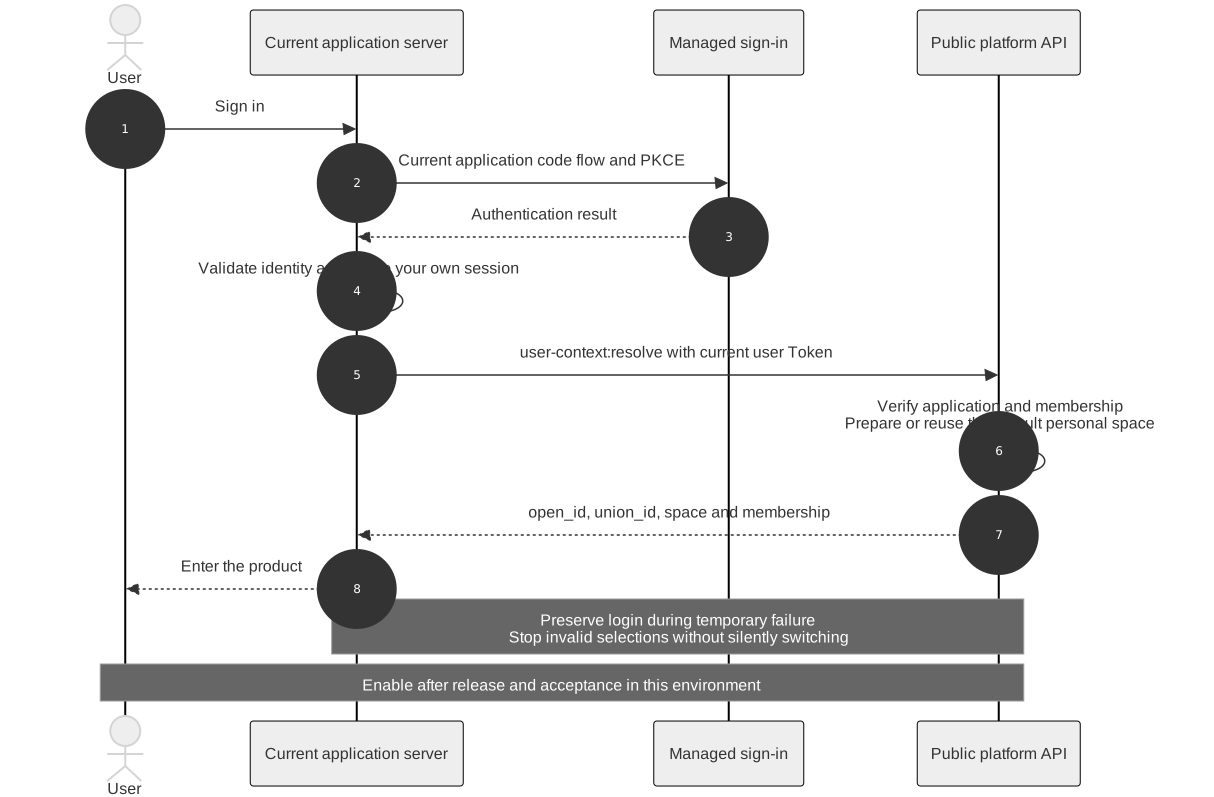
View the full login sequence diagram
4. Correlate events with business records
Validate the source for the selected transport, then check the Schema, Application, environment and customer scope. Long connections ACK after durable processing; HTTPS receivers return 2xx after durable receipt and process resource versions asynchronously. These rules apply to subscription events; use each other event's own Schema.
tenant_idanddata.organization_ididentify the same purchasing workspace.data.open_platform_application_idanddata.environmentmatch your receiver's configured Application and environment.- Correlate by Application, environment, workspace and subscription
data.id. Do not combine different Applications using onlyorganization_id. - Deduplicate by
event_idand applyresource_versionto the same subscription; duplicates and older events do not provision twice or replace newer state. - Verify subscription and individual member access separately. A business purchase does not grant every member access.
A workspace can buy both Application A and Application B, with independent subscriptions. A user purchasing through two workspaces also needs separate records. For membership-related oem.access_context.changed.v1, correlate data.subject_id with space.membership_id, not the last logged-in user. See the event catalog.
5. Minimal integration checks
| Scenario | Expected result |
|---|---|
| Current Application user login | Exact callback completes and your application creates a session; no service Secret |
| First authorized API request | Succeeds; missing API configuration is rejected explicitly |
| One customer subscribes to two Applications | Each callback updates only its Application |
| One user participates in two workspaces | Requests, events and access remain scoped to the actual workspace |
| Wrong Application, environment or signature | Rejected without changing records |
| Duplicate or older event | Deduplicated or ignored without provisioning twice |
| New user has no workspace | Identified as a platform onboarding gap, without a hardcoded ID workaround |
“Action required” may refer to incomplete Sandbox acceptance, not unusable active login. Open the Application to inspect the actual next action. Integrate configured capabilities first, then submit acceptance using the application workflow.
See Users and customer spaces for the request, response and recovery contract of POST /open-platform/v1/user-context:resolve.
6. Report client diagnostics
POST /open-platform/v1/client-diagnostics accepts the current application's user OAuth Bearer and a dedicated Idempotency-Key. Send only request_id, operation, reason_code, status_code and duration_ms. Exclude request or response bodies, credentials, personal data and URLs. The verified login determines the application; callers cannot select another application.
Records are client reported and do not prove server execution. Each user can report up to 60 records per application per minute; records are retained for seven days. Creation returns 201, an identical replay returns 200, and key reuse with different content returns 409. Authentication or current test eligibility failures return 401/403, rate limits return 429, and unavailable dependencies return 503. If the outcome is unknown, retry the same key and content. Find the Request ID in Developer Console's client logs and associate it with technical feedback.
7. Receive events over a persistent connection
Configure either HTTPS delivery or a persistent connection in Developer Console. Connections require the current application's service OAuth Bearer with openplatform.api.invoke. Do not use user login credentials or put tokens in URLs.
Open SSE with GET /open-platform/v1/applications/{id}/events:stream. Persist processing and deduplicate by event_id before calling POST /open-platform/v1/applications/{id}/events:ack with only the frame's delivery_id and lease_receipt. Each subscription has one unacknowledged delivery with a 30-second lease; disconnections or expiry can cause duplicates. Old leases or duplicate ACKs return 409. On an error frame or disconnection, verify current application authorization and reconnect. Last-Event-ID does not acknowledge delivery. Changing event transport does not turn synchronous callbacks into asynchronous events. Run the Node.js long-connection example to get started.
8. Process received fulfillment and membership events
The service identity's built-in openplatform.api.invoke scope supports these operations without governance scopes, internal reconciliation privileges or customer consent. Every request revalidates the current Application identity. Feature evaluation and membership snapshots require the current publication, capability and revocation checks. Application or machine identity revocation also applies to existing tokens and idempotency keys.
| Operation | Purpose |
|---|---|
POST /open-platform/v1/applications/{id}/integration-features:evaluate | Evaluate this Application's integration capability; body application_id and environment must match |
POST /open-platform/v1/applications/{id}/events/{event_id}/access-snapshot | After oem.access_context.changed.v1, send {} to read the original event member's current minimal access snapshot |
POST /open-platform/v1/applications/{id}/events/{event_id}/fulfillment-result | After oem.fulfillment.requested.v1, report the original attempt and outcome with a stable Idempotency-Key |
The {event_id} must identify an actual event durably recorded for this Application. Customer, member, product, subscription and fulfillment operation are derived from that event. Caller-selected customer fields, query parameters or organization/Application scope headers are rejected. The snapshot excludes internal identities, user profiles, delegations and unrelated members. Events from another Application are denied or absent; union_id never widens access.
A fulfillment result contains attempt, status (succeeded or failed) and retryable, with optional product_tenant_id, provider_request_id, error_code and error_message. The platform calls the commerce Owner and validates the original attempt and transition. Third parties never store an internal CRM token. A 409 requires checking the original attempt or idempotency conflict; retry a temporary 503 with the original request and key.
After a version goes offline or its receiver is paused, the result endpoint can still finish an already dispatched fulfillment request. Recovery remains bound to the original customer, Application, environment, operation and attempt, the current machine identity, and the commerce Owner's current operation state. It cannot create new fulfillment, expand event access or read membership snapshots. Unsent events, foreign Application events and stale attempts are rejected.