
Authentication and authorization
GoodVision provides identity authentication through OAuth 2.0 and OpenID Connect. This guide explains how to choose an authentication flow, obtain an access token, and integrate user sign-in.
One Application supports application and user identities, each with a separate OAuth client, API grant, and status. After authentication, business APIs still check audience, scopes, organization, ProductAccess, and resource ownership.
Developer Console sign-in
The Developer Console uses GoodVision's managed identity service for sign-in. The process is:
- Use your own account to complete Authorization Code + PKCE sign-in with the managed identity service.
- The platform reads available enterprises. An account with no enterprise gets a personal space automatically, followed by a current access check.
- Enter the selected valid enterprise or explicitly choose an available one. The Application creator automatically becomes its owner without preparing business roles.
- Ordinary members collaborate according to current Application access. Revoked enterprise or Application access stops operations in that scope rather than silently switching to another enterprise.
For a Partner-to-Customer call, the server may also submit acting_organization_id. It only selects the Partner context and must be validated against an approved delegation; the frontend cannot grant cross-organization access through a header.
Access, refresh, and ID tokens remain in the encrypted server-side session. The browser receives only non-sensitive user information, organization information, and permission summaries.
Recover expired sign-in
When sign-in expires, use the sign-in action on the original page. The Console checks the account and current permissions. The same account and valid scope can retain ordinary drafts. Temporary Secrets and sensitive confirmations for deletion or ownership are cleared. Creation, saving, payment and forwarding are never replayed automatically; review the original page and submit explicitly.
If your sign-in and workspace cannot be checked after returning, select Recheck workspace to read the current state without opening another sign-in window. Sign in again only if your session has expired. Rechecking never submits the original operation automatically.
If the first submission is explicitly rejected because sign-in or verification is required, returning only reloads current permissions and configuration revisions. Review the retained draft and confirm again to start a new operation.
A submitted request whose result is unknown separately retains its original content, revision and operation identifier. After the same account and valid scope completes sign-in or verification, use Recover original request to confirm the outcome. Do not edit that content or create a second operation. A new sensitive operation still requires confirmation.
A changed account, sign-out or revoked enterprise or Application access clears old data and actions. Retry reads when a dependency is unavailable rather than treating failure as an absent enterprise or using another person's account.
Verify sensitive actions
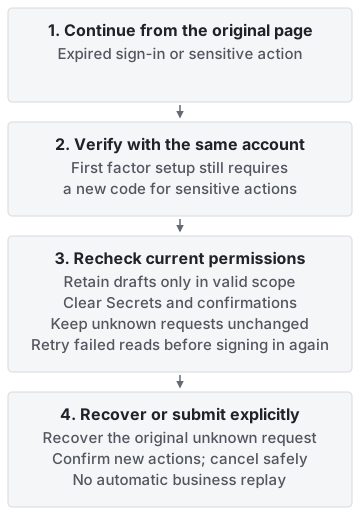
Diagram: review and explicitly submit the original action after verification. This illustration does not prove that code verification has completed.
Ordinary sign-in and daily integration do not require setting up a second factor first. Ownership transfer and forwarding to platform support can require recent verification. Follow the page to managed sign-in and complete the requested authenticator code. Ownership transfer and platform forwarding require verification within the last five minutes.
After first configuring an authenticator, complete a new code verification. Saving a factor does not by itself complete verification for the sensitive action. Retry failed verification or cancel without submitting the operation. Authorized ordinary drafts can remain after return, but sensitive confirmation must be completed again. Business requests are never replayed automatically.
Choose an OAuth flow
| Scenario | Console choice | OAuth flow | Credential storage |
|---|---|---|---|
| Workers, scheduled jobs, service-to-service calls | Application permissions | Client Credentials | Client Secret in a server-side secret manager only |
| User sign-in to a web application | User permissions | Authorization Code + PKCE (S256) public client | Server-side session or BFF; no Client Secret |
| Browser calls directly to business APIs | Not recommended | Do not issue a long-lived browser credential | Use a BFF to keep tokens out of browser scripts |
Sandbox Applications can enable application identity, user identity, or both. User identity requires exact callback URLs; application identity requires a server-side Secret storage plan. They use different Clients and never share scopes, subscriptions, consent, or tokens.
Ordinary user login setup needs one exact HTTPS callback. The logout URL and web origin are filled automatically, with advanced settings available when needed. APIs and permissions and OAuth/OIDC use the same setup flow. If saving succeeds before identity readback, choose Reload user identity without configuring it again. See Complete setup on the current page.
Configure an OAuth client
- Create an Application in a space where creation is allowed. The creator becomes its owner automatically, and the platform provisions the initial identity from the creation configuration.
- Enable application identity, user identity, or both as needed. Supply exact callback URLs for user identity.
- The platform validates the current Application relationship and identity configuration, then provisions a separate OAuth Client for each enabled identity. User identity is a public Client with mandatory PKCE S256; application identity uses Client Credentials.
- Select an API Product and minimum scopes under the current identity only when business APIs are needed. The platform checks identity, scope policies, data boundaries and quotas, then binds permissions to that identity's Client and enables the grant. Login alone requires no business API Subscription.
- Application Client Secrets are retrieved or rotated through the method shown in the Console. User identity has no Secret.
The Developer Console does not expose platform administration or dynamic registration and never returns management tokens. A dedicated Secret response is no-store. Application secrets stay masked by default, and frontend memory is cleared when the developer leaves the page or switches Application or organization. Rotation immediately invalidates the old Secret. User identity never has a Client Secret and can self-serve exact callback URLs on the OAuth/OIDC page.
Each API request checks the token, audience, scopes, current identity's API grant, and organization, product, and resource permissions. Any failed condition denies the request.
Obtain a Sandbox Application backend service token
The command below uses the issuer supplied by the current Development or test-us deployment, while the credential remains scoped to the current sandbox Application. Never reuse someone else's token, browser session, or shared administrator token.
Use the exact GOODVISION_IDENTITY_ISSUER from the current Application. Read its /.well-known/openid-configuration, verify the returned issuer, and set GOODVISION_TOKEN_ENDPOINT to its token_endpoint. Do not append a fixed identity path.
curl --request POST \
  --url "${GOODVISION_TOKEN_ENDPOINT}" \
  --header 'content-type: application/x-www-form-urlencoded' \
  --data 'grant_type=client_credentials' \
  --data 'client_id=YOUR_CLIENT_ID' \
  --data 'client_secret=YOUR_CLIENT_SECRET'
Use the returned token only with the environment and API Product for which it was issued:
curl --request GET \
  --url "${GOODVISION_API_BASE}/v1/resource" \
  --header "authorization: Bearer ${GOODVISION_ACCESS_TOKEN}"
Use GOODVISION_API_BASE and resource paths provided by the current Application's API product. The /v1/resource path above is a placeholder and cannot be called directly.
Production requires a new token from the release-configured GOODVISION_IDENTITY_ISSUER under the production API Product contract. Do not reuse the test-us issuer, client, or credentials.
User sign-in
Integrate user sign-in with Authorization Code + PKCE:
- Generate a high-entropy
code_verifierand SHA-256code_challenge. - Send and retain
state; validatenoncewhen an ID Token is used. - Submit passwords, MFA, or passkeys only to the GoodVision managed sign-in page.
- Exchange the Authorization Code in the backend and store tokens in a server-side session when a backend exists.
- Validate the signature,
iss,aud, expiry, and application authorization context. - Destroy the local session at logout and call the OIDC End Session Endpoint when required.
The redirect_uri must exactly match a registered value. Wildcards are not allowed.
Authorization checks
An access token authenticates the caller. Access to business resources also requires these conditions:
| Application permissions | User permissions |
|---|---|
| Token comes from the current service Client | Token comes from the current user Client |
| The service API grant and scope are active | The user API grant and scope are active |
| Application identity is approved for the target organization | The user consented and the platform delegated grant is active |
| The Application may access the target resource | The unified permission service and target resource allow the current user |
Issuer, Audience, organization, ProductAccess, Entitlement and resource state must also permit the operation. Failure of any condition rejects the request.
A browser-provided organization_id is only a candidate. The server must authorize it and must not allow a request header to override the trusted context.
Security notes
- Never log tokens, Authorization Codes, client secrets, or private keys.
- Never send a Sandbox token to Production or vice versa.
- Refresh or reacquire tokens before expiry; never extend them locally.
- Use different Clients for user and application identity within one Application. Sandbox and Production use separate Applications and credentials.
- Rotate an exposed or lost secret instead of trying to retrieve it.
- Never treat a successful sign-in or a token claim as a replacement for API Product, organization, or resource authorization.
User and customer space after login
After login, read open_id, union_id and the customer space. Product API grants remain separate.