
Integrate Third-party SaaS Billing
GoodVision's customer workspace provides plan selection, subscriptions, payments, and billing management for third-party SaaS products. This guide covers platform entry points, sign-in and payment redirects, and subscription status updates.
The current plan supports fixed monthly or yearly SaaS fees, monthly plan Credits and published one-time add-ons. Credits are usage allowances, not withdrawable stored value. Undeclared overage charges are never enabled automatically.
Current availability
GoodVision's customer workspace provides plan, subscription, payment and billing pages. The Commerce Checkout Sandbox API Product is implemented. The current application must receive its matching API configuration in Developer Console before calling it. Production routes are not open.
You can first implement platform navigation, the OIDC BFF and page integration, then receive redacted subscription, payment and refund events under enabled scopes. The API uses billing_interval=month|year for monthly or annual billing.
Integration approach
| Scenario | Third-party product | GoodVision platform |
|---|---|---|
| Product features | Renders the partner's own business pages | Does not copy partner product features |
| Pricing, comparisons, FAQs | Hosts the platform iframe on a separate page, with an independent link | /console/pricing provides personal/business and monthly/annual plans |
| Subscriptions, payments, bills, entitlement management | Embeds platform management in a dialog, or opens it independently | /console/subscription and /console/billing provide management |
| Applications, API Products, webhooks | Shows only a Developer Console entry | Developer Console owns technical integration |
| Product access decisions | Query necessary state through enabled APIs | Return current results after order, payment and access checks |
The third party does not implement a second local plan catalog or order/payment state machine. SaaSdemo's /app/pricing embeds the platform pricing iframe while retaining the workspace sidebar; /pricing provides a separate host page with the public site header. “My subscription” opens a management dialog in either entry. Pricing and management have separate pages. Sidebar navigation preserves the selected product across pricing, subscriptions and billing; independent links retain the same application, environment and product. The application may handle the platform-frozen payment return navigation, while the platform retains all commercial and access facts.
Open the customer workspace
Configure the current environment's customer-workspace URL on your server. Use /console/pricing for pricing, /console/subscription for management, and /console/billing for billing. See platform.subscriptionUrl and platform.billingUrl in SaaSdemo.
Open independently or embed an iframe under a registered Origin. Only published scope selectors and display parameters are supported:
| Parameter | Required | Values / when omitted |
|---|---|---|
embed | Optional | 1; omit for a standalone page |
locale | Optional | zh-CN|en-US; omit to use the current language |
view | Optional | subscription|billing; omit to use the current page |
theme | Optional | light|dark; omit to use the current theme |
application, environment | 🔴 Conditional | Send together for the pricing entry or explicit Application selection: authorized slug and sandbox|production |
product | 🔴 Conditional | Required when multiple products cannot be resolved uniquely; otherwise omit for the current product |
For example, /console/pricing?application=<slug>&environment=sandbox&product=<code>&locale=en-US. These parameters select an already authorized scope; they grant no permission. A SaaSdemo instance is bound to its server-configured application and environment and rejects mismatching URLs. The production enum does not enable Production routes.
Unpublished business query parameters and third-party handoff tokens are rejected. Do not supply Organization, ProductTenant, Plan, amount, currency, Provider, fabricated payment results, Token, Secret or arbitrary return_url. Current identity and server-side authorization determine the actual scope.
When the iframe is unauthenticated, it sends goodvision.customer-billing.auth_required. Use a fixed targetOrigin to complete sign-in in the top-level window, then refresh the iframe. Payment-method and plan operations still require CSRF and idempotency checks. Stripe Hosted Checkout always opens as a full page.
Independent pages use the platform session. Applications approved for embedding may use auth=parent-bff: the host's same-origin BFF forwards platform-page requests. Both sides verify the exact Origin, original iframe and closed message contract; services still verify the current user, organization, application and capability. Tokens, cookies and CSRF secrets never cross messages or URLs. An expired session returns to managed sign-in.
Return according to the application opening mode
Embedding your application in Console and embedding platform pricing/subscription pages in your application are separate integration directions. See web application development and configuration for application opening modes.
After creating the original checkout, the platform commercial iframe sends its direct parent:
{
  "type": "goodvision.customer-billing.checkout_started",
  "provider": "stripe",
  "checkout_url": "https://checkout.stripe.com/<original-platform-issued-payment-path>"
}
Before using the original URL, verify the configured platform's exact origin, the original commercial iframe's event.source, message fields, and the HTTPS checkout.stripe.com origin. A matching message name alone cannot authorize a URL.
| Application opening mode | Checkout and return |
|---|---|
| Redirect / standalone | Open the original payment URL as a top-level page; the provider returns to the platform-frozen application entry, then read the original subscription |
| Isolated iframe | Preserve Console and the application iframe; a customer action opens a separate payment window, then success or cancellation resumes the original application subscription page |
| Trusted qiankun mount | Preserve the original Console mount; handle returns through the application's own registered origin, without putting a standalone application path in Console's top-level address |
The application implements window communication, correlation checks, and cleanup for embedded mode; follow subscription checkout and return. The platform rejects browser-defined return_url, and a completion message grants no commercial access. A blocked popup, manual closure, or missing receipt preserves the original order; read its status and resume the original payment. Enable features only after confirming the original subscription, fulfillment, and product access.
Platform-side commercial flow
All of these steps run in GoodVision's platform and the payment provider's hosted page:
- A new customer creates an organization and submits their customer profile for platform review and valid billing/commercial preparation. Organization creation alone does not enable payment; another customer's billing account is never copied.
- Pricing reads published plans for the selected application, environment and product. Configuration controls Free availability, personal/business plans, periods, seats, FAQs and offers.
- The subscription confirmation dialog shows terms, initial and recurring prices. The platform freezes the original order and subscription.
- Paid plans open Stripe Hosted Checkout in the top-level window. Explicit Free acceptance activates without a zero-amount Stripe payment.
- Trusted Webhooks or server-side readback confirm the original payment and subscription. Annual Credits are still released monthly, without duplicate grants after replay.
- Signed fulfillment events enter the application's Inbox. The application reports activation, and features open only after confirmed ProductAccess.
- Return to the original subscription and read plan, Credits and delivery results. Failures or unknown outcomes resume the original order instead of creating a replacement purchase.
A page return proves only navigation completion. It does not prove payment or product-access success.
Third-party server responsibilities
- Authorization Code + PKCE, same-origin sessions, and CSRF.
- The third-party product experience and business APIs.
- Reading platform entries from runtime configuration instead of hard-coding environment hosts in browser code.
- Query necessary ProductAccess state or receive signed Webhooks when the corresponding API product is enabled.
- Re-reading access after the user returns; restricted features remain unavailable until access is confirmed.
An approved host BFF may forward platform-page commands, but owns no order, payment or Hosted Checkout state machine. Platform management issues cancellation, refund, plan and payment-method operations, and the corresponding Owner makes the final decision.
Optional APIs and events
Some products need backend awareness of access or lifecycle events. Implement only capabilities covered by an API Product issued to the current Application:
- read-only ProductAccess/Entitlement;
- read-only subscription state;
- versioned subscription, payment/refund, and access events;
- idempotent synchronization through signed webhooks.
Get Base URL, Audience, scopes, paths, fields and event schemas from the current application’s API configuration. Verify webhook signatures, deduplicate by event_id, and use resource_version to prevent stale updates. Query an authorized API when versions have a gap.
Plan and VIP access changes
Request oem.access_context.changed.v1 for the Application in Developer Console. The event means that effective access has changed; it does not mean that a user received a VIP Role. Plan tiers belong to Plan/SaaSSubscription, product access belongs to ProductAccess/Entitlement, and Role/Capability only represents administrative and operational permissions.
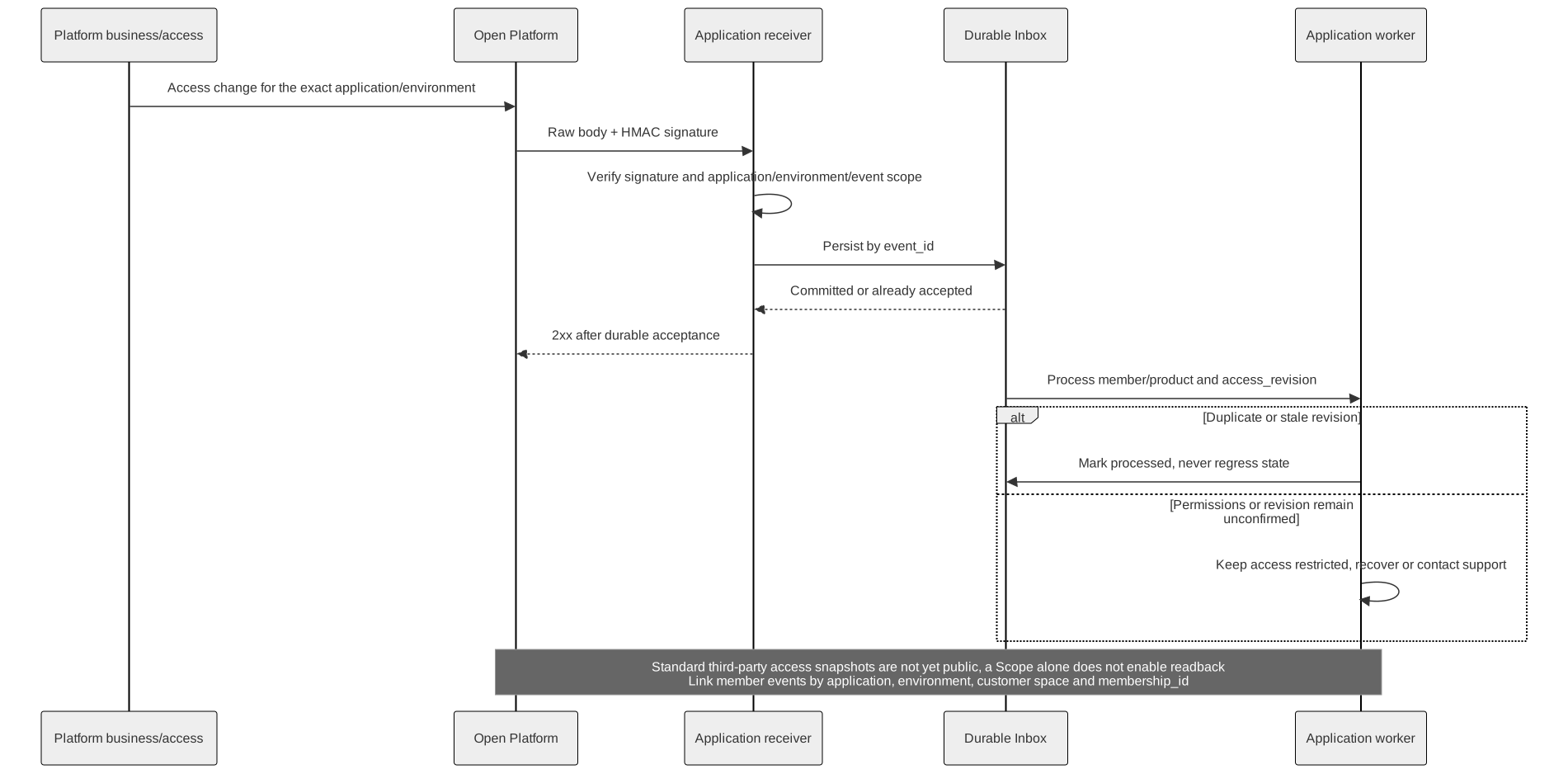
- Verify
X-GV-Signatureover the raw body, match the event headers to the envelope, and requiredata.open_platform_application_id + environmentto match the receiver's server-side configuration exactly. Never fall back to the customer Organization or application slug. - Persist an Inbox record by
event_id, then return2xxquickly. - Identify duplicate or older
data.access_revisionvalues. Mark a new version aspending_readbackand immediately restrict the member’s local access. - Product access snapshots are not yet available to standard third-party applications. Requesting a scope does not enable readback. Keep access restricted when processing a new access revision or a version gap, and contact support to confirm the recovery path. Do not call internal APIs or guess user mappings.
- Once public readback is available, follow its published contract to match the Application, customer workspace and member. Atomically update necessary local permission records only when the returned version is at least the event version. Keep access restricted after revocation, scope mismatch or query failure.
Use API-defined Entitlement values to check plan capabilities, for example the synthetic relaydesk.tier.pro. role=VIP describes a role and cannot determine plan access. Do not maintain a fixed plan_code -> entitlement mapping.
Go-live acceptance
- Pricing host pages, subscription-management dialogs and independent links consume platform pages without a second commercial source of truth.
- The commercial entry comes from server-side environment configuration and has no unpublished query parameter.
/console/pricing,/console/subscriptionand/console/billingembed only under registered Origins; the application cannot expandframe-ancestors.- Embedded and independent links retain authorized application/environment/product selection. Invalid scope is refused; theme, FAQs and original-request recovery remain stable.
- Independent sessions and approved parent-BFF transport both verify the current identity; no token, secret or organization identifier crosses URLs or messages.
- A payment-page return, webhook delivery, or successful login never directly enables product features.
- The third party enables restricted capabilities only after ProductAccess/Entitlement is confirmed active.
- Client secrets, payment credentials, and complete card data stay out of browser traffic, logs, monitoring, and tickets.
- The third party calls no guessed commercial route before a SaaS Billing API Product is issued.
Continue with the SaaSdemo Integration Example, SaaS Billing Contract Reference, Authentication, and Webhooks.
The snapshot API is not yet open to standard applications. Review Product access snapshot and contact support to confirm customer-scoped read access before integration.